;
};
The OpenWork MCP Gateway is one MCP endpoint for everything your organization has made available to you: skills, plugins, workflows, and connections. Instead of configuring one MCP server per service, your agent connects to the gateway once and discovers capabilities on demand. The public hosted endpoint is:
```text theme={null}
https://api.openworklabs.com/mcp/agent
```
This guide is for connecting an external MCP client to OpenWork. To connect
Gmail, calendar, Drive, Slack, Notion, Linear, or another service inside the
OpenWork desktop app, use
[Connect your services](/start-here/connect-your-stack/connect-services).
Your client opens a browser, you sign in to OpenWork, choose the organization to authorize, and the client stores the OAuth token for that organization.
`app.openworklabs.com/api/den` is an internal same-origin desktop proxy used by OpenWork first-party flows. Do not paste it into external MCP clients.
## Set up your client
Step-by-step guides for every client:
## In the OpenWork desktop app
If you use the OpenWork desktop app, there is no MCP endpoint to configure.
When you sign in, the app injects OpenWork Connect with access scoped to your
active organization and refreshes that first-party access automatically. Use
`Settings` > `Connect` to sign in to the services available to you.
## Client support status
| Client | Status | Notes | Guide |
| --------------- | ---------- | --------------------------------------------------------------------------------------------------------------------------------------------------------------------------------------------------------------------------------------------- | ------------------------------------------------------------------------- |
| OpenCode | Verified | Native remote MCP OAuth passed end-to-end implementation testing. | [OpenWork MCP for OpenCode](/model-context-protocol/opencode) |
| Codex | Setup only | Add/login/reconnect steps are below; native remote MCP OAuth must be rerun on this exact branch before Codex is marked verified. | [OpenWork MCP for Codex](/model-context-protocol/codex) |
| Cursor | Setup only | Cursor Web/Agents use an HTTPS OAuth callback. Cursor Desktop OAuth uses `cursor://anysphere.cursor-mcp/oauth/callback`, which OpenWork accepts through an exact private-use allowlist with PKCE S256 enforced. Native proof is not complete. | [OpenWork MCP for Cursor](/model-context-protocol/cursor) |
| ChatGPT Desktop | Setup only | Setup guide only; use ChatGPT `Settings > MCP servers`. Native proof is not complete. | [OpenWork MCP for ChatGPT](/model-context-protocol/chatgpt) |
| Claude Code | Setup only | Setup guide only; native proof is not complete. | [OpenWork MCP for Claude Code](/model-context-protocol/claude-code) |
| Claude Desktop | Setup only | Setup guide only; native proof is not complete. | [OpenWork MCP for Claude Desktop](/model-context-protocol/claude-desktop) |
| VS Code | Setup only | Setup guide only; native proof is not complete. | [OpenWork MCP for VS Code](/model-context-protocol/vs-code) |
| Windsurf | Setup only | Setup guide only via mcp-remote; native proof is not complete. | [OpenWork MCP for Windsurf](/model-context-protocol/windsurf) |
| Zed | Setup only | Setup guide only via mcp-remote; native proof is not complete. | [OpenWork MCP for Zed](/model-context-protocol/zed) |
| Gemini CLI | Setup only | Setup guide only; native proof is not complete. | [OpenWork MCP for Gemini CLI](/model-context-protocol/gemini-cli) |
| Any client | Setup only | Use only with clients that support remote Streamable HTTP MCP servers and OAuth. | — |
## OpenCode setup
Add this MCP entry to your OpenCode config:
```json theme={null}
{
"mcp": {
"openwork": {
"type": "remote",
"enabled": true,
"url": "https://api.openworklabs.com/mcp/agent",
"oauth": {}
}
}
}
```
Then authenticate:
```sh theme={null}
opencode mcp auth openwork
```
If OpenCode runs on a remote machine but the browser opens locally, follow
[Connect OpenWork MCP from a remote machine](/cloud/run-in-the-cloud/connect-openwork-mcp-remote-machine).
To reconnect or switch organizations, remove the old token and authenticate again:
```sh theme={null}
opencode mcp logout openwork
opencode mcp auth openwork
```
Full guide: [OpenWork MCP for OpenCode](/model-context-protocol/opencode).
## Codex setup
Codex is setup-only for this PR until its native OAuth flow is rerun on this exact branch.
Add OpenWork, then log in:
```sh theme={null}
codex mcp add openwork --url https://api.openworklabs.com/mcp/agent
codex mcp login openwork
```
To reconnect or switch organizations, log out and log in again:
```sh theme={null}
codex mcp logout openwork
codex mcp login openwork
```
Full guide: [OpenWork MCP for Codex](/model-context-protocol/codex).
## Cursor setup-only guide
Paste the OpenWork Connect endpoint where Cursor asks for the remote MCP server URL, then start OAuth from Cursor's connection prompt:
```text theme={null}
https://api.openworklabs.com/mcp/agent
```
Cursor Web/Agents use an HTTPS OAuth callback. Cursor Desktop OAuth uses the private-use callback `cursor://anysphere.cursor-mcp/oauth/callback`, which OpenWork accepts through an exact allowlist with PKCE S256 enforced, so intercepted authorization codes cannot be redeemed without the code verifier.
Full guide: [OpenWork MCP for Cursor](/model-context-protocol/cursor).
## ChatGPT setup-only guide
Open ChatGPT `Settings > MCP servers` ([open settings](https://chatgpt.com/#settings/Connectors)), paste the OpenWork Connect endpoint, and start OAuth from ChatGPT's connection prompt:
```text theme={null}
https://api.openworklabs.com/mcp/agent
```
Full guide: [OpenWork MCP for ChatGPT](/model-context-protocol/chatgpt).
## Organization selection
The organization you choose in the browser is pinned into the token. Changing the active organization in OpenWork later does not change an external client's existing token. Use the logout/auth or logout/login reconnect commands above when you need a different organization.
## What you can ask the agent
Once connected, your agent can use OpenWork capabilities from plain English in the composer. These flows are exercised end to end against a live OpenWork Cloud deployment:
* **Check your cloud identity** — "Which OpenWork Cloud organization am I
connected to?" The agent reports the organization, your account, and your
role.
* **Invite teammates** — "Add [omar@example.com](mailto:omar@example.com) to my organization." The agent
sends the invitation, updates the allowed email domains when needed, and
surfaces seat-limit billing rules instead of failing silently.
* **Manage teams** — "Assign Priya to the Sales team." Works for active
members; the agent explains when someone still has a pending invitation.
* **Share skills with your org** — "Create a skill that writes weekly status
reports and share it with my whole organization." The agent writes the
skill inside a plugin, adds the plugin to a Collection, and grants the
Collection org-wide — teammates find the assigned skill in `Settings > Library`.
Org policy still applies: invitations respect seat limits and domain rules, and resource access follows organization membership, roles, policies, and exposure allowlists.
## OAuth and protocol details
OpenWork Connect is a remote Streamable HTTP MCP server with OAuth:
* The protected resource is exactly `https://api.openworklabs.com/mcp/agent`.
* Clients discover OAuth metadata with RFC9728 protected-resource discovery.
* The authorization server and browser sign-in origin is `https://app.openworklabs.com/api/auth`.
* OAuth authorize and token requests must include exactly one `resource` value: `https://api.openworklabs.com/mcp/agent`.
* Clients that need registration use dynamic client registration as a fallback during discovery.
* PKCE is required for public/dynamic clients, and only the `S256` code challenge method is supported.
* Redirect URIs must be HTTPS callbacks or HTTP loopback callbacks such as `http://127.0.0.1:/callback`. Private-use callback schemes are not accepted for public OAuth clients, except exact allowlisted callbacks for known native clients — currently Cursor Desktop's `cursor://anysphere.cursor-mcp/oauth/callback` — with PKCE S256 enforced.
## Token lifetime and refresh
Clients normally refresh automatically. The values matter when diagnosing reconnects:
* Public OAuth access tokens are JWTs signed and validated with EdDSA. The issuer is exactly `https://app.openworklabs.com/api/auth`, the audience is exactly `https://api.openworklabs.com/mcp/agent`, and access tokens expire after 45 minutes.
* Refresh tokens are opaque rotating grants with a 30-day inactivity window and a 30-second rotation overlap for near-simultaneous refreshes.
* Each refresh revokes the previous refresh grant; because OpenWork stores only token hashes, a replay during the overlap can issue another successor instead of returning prior plaintext.
* Successor grants remain normal rotating grants. If an old refresh grant is replayed after the overlap, expired, or revoked, the client may receive `invalid_grant` and the client/user refresh-token family is revoked. Reconnect by logging out of the MCP entry and authenticating again.
* Access is rechecked against the active OpenWork session and organization membership, so removing a member or revoking the session cuts off MCP access.
## What the gateway exposes
Instead of flooding your client with hundreds of tool definitions, the gateway keeps the tool list small and constant. `/mcp/agent` exposes two discovery tools:
* `search_capabilities` searches the capabilities available to the signed-in member.
* `execute_capability` runs an exact capability name returned by `search_capabilities`.
Search can include OpenWork Cloud resources such as skills, plugins, connectors, Collections, workers, members, roles, teams, model providers, and org-connected external MCP tools when those capabilities are enabled and shared with the member.
Availability is governed by organization membership, role, policy, and exposure allowlists. It intentionally does not expose authentication internals, admin-only system routes, webhooks, API-key creation or deletion, or credential-returning endpoints.
### MCP token scopes
`mcp:read` permits discovery, connection-status probes, and read-only native API
operations. **Every external MCP provider tool invocation requires `mcp:write`,
including tools advertising `readOnlyHint: true`.** The provider controls those
hints, and OpenWork has no trusted classification proving that a provider tool
cannot modify data through the connected credential. Hints describe a tool;
they do not grant execution authorization.
This requirement applies to generic execution, direct connections, compatibility
wrappers, Code Mode, and MCP App helper calls. The private `mcp:app-host` scope
selects the App audience; it does not replace `mcp:write`. Scripts that only
compute or call read-only native APIs do not require write scope.
The desktop app already requests both read and write scopes, and its separately
minted App-host token carries both. Existing read-only tokens are not upgraded:
to invoke an external provider tool, explicitly authorize the OpenWork client
for `mcp:write`. This is separate from reconnecting the provider account, and
does not bypass connection grants or organization tool policy.
## MCP Apps
Some gateway results come back as MCP Apps: interactive UI rendered from a tool result instead of plain text, such as a created-skill confirmation card or a workflow result view. These use the standard [MCP Apps extension](https://modelcontextprotocol.io/docs/extensions/apps) (`ui://` resources declared on tools). Rendering requires a compatible host and its advertised capabilities; clients without App support receive readable fallback content.
To put an MCP App on a team dashboard, see [Dashboards](/cloud/share-with-your-team/dashboards).
OpenWork's renderer supports a [documented subset of the stable 2026-01-26 host protocol](/cloud/share-with-your-team/dashboards#supported-host-protocol): complete launch input before result, inline display, bounded resizing and teardown, and server tools and links gated by the originating view. Conversation actions keep their original endpoint, workspace, session and live launch lease, including in split panes; dashboard actions keep their exact launching endpoint with no conversation session. Archived conversations, cached dashboard previews without a fresh launch, and generated read-only views cannot call tools or open links. Message/context writes, View tools, resource proxies, streaming input, and full progress/cancellation forwarding are not supported. This is not a claim that every App feature runs in OpenWork.
The gateway preserves provider `structuredContent` rather than adding fields to it. OpenWork launch and helper information lives in namespaced `_meta` keys (`openwork/mcpApp`, `openwork/serverTools`). Advisory schema warnings use `openwork/schemaGuidance` in `_meta` and a separate model-visible text block; private provider `_meta` is not copied into that text. See [Provider data and gateway additions](/cloud/share-with-your-team/dashboards#provider-data-and-gateway-additions).
MCP Apps from third-party providers render in OpenWork through its private App host. For an external MCP Apps-capable client, enable direct exposure and add the connection's own MCP URL from **Your Connections → Use in another app**. That endpoint exposes resources bound to permitted model-visible tools; it does not expose arbitrary resources or app-only helper tools. Initial App loading and interactive callback support are distinct. See [Use a connection in another MCP client](/cloud/share-with-your-team/shared-mcp-connections#use-a-connection-in-another-mcp-client).
## Troubleshooting
* **401 missing or invalid token**: run the client's auth/login command again. Confirm the client points to `https://api.openworklabs.com/mcp/agent`.
* **403 membership or scope error**: confirm you selected the right organization and still have membership and required permissions there.
* **`invalid_grant`**: the refresh grant was expired, revoked, or replayed after the 30-second rotation overlap. Run logout, then auth/login again.
* **429 rate limit**: wait for the response's `Retry-After` value before retrying.
* **Support requests**: include the response `X-Request-Id` header plus any JSON body MCP `referenceId` or OAuth `reference_id` field so OpenWork support can find the server-side trace.
## Requirements
* An OpenWork Cloud account and organization.
* An MCP client that supports remote Streamable HTTP MCP servers.
* OAuth support in the MCP client, including browser-based authorization.
If your client does not support OAuth for remote MCP servers, it cannot connect to OpenWork Connect yet.
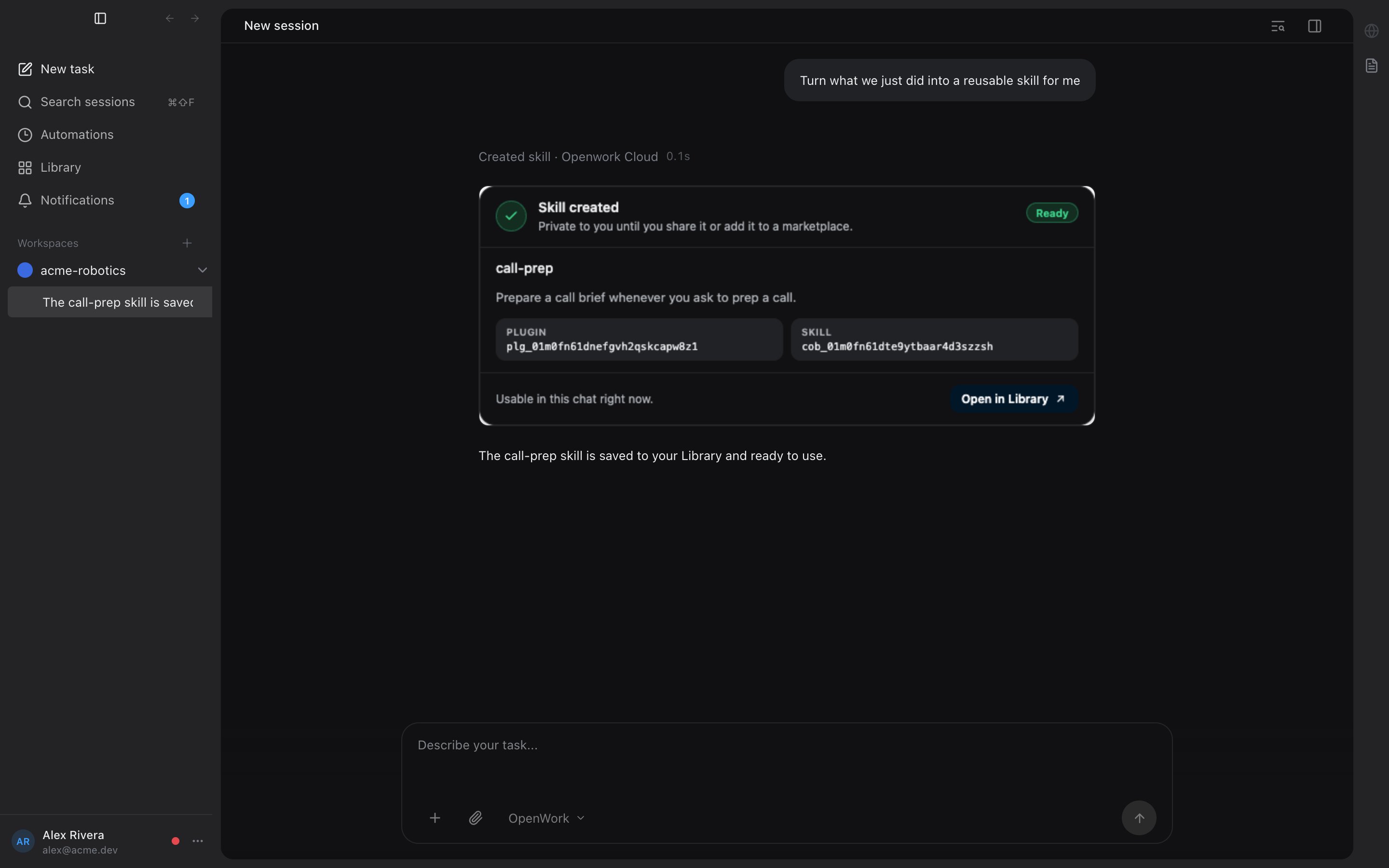 MCP Apps from third-party providers render in OpenWork through its private App host. For an external MCP Apps-capable client, enable direct exposure and add the connection's own MCP URL from **Your Connections → Use in another app**. That endpoint exposes resources bound to permitted model-visible tools; it does not expose arbitrary resources or app-only helper tools. Initial App loading and interactive callback support are distinct. See [Use a connection in another MCP client](/cloud/share-with-your-team/shared-mcp-connections#use-a-connection-in-another-mcp-client).
## Troubleshooting
* **401 missing or invalid token**: run the client's auth/login command again. Confirm the client points to `https://api.openworklabs.com/mcp/agent`.
* **403 membership or scope error**: confirm you selected the right organization and still have membership and required permissions there.
* **`invalid_grant`**: the refresh grant was expired, revoked, or replayed after the 30-second rotation overlap. Run logout, then auth/login again.
* **429 rate limit**: wait for the response's `Retry-After` value before retrying.
* **Support requests**: include the response `X-Request-Id` header plus any JSON body MCP `referenceId` or OAuth `reference_id` field so OpenWork support can find the server-side trace.
## Requirements
* An OpenWork Cloud account and organization.
* An MCP client that supports remote Streamable HTTP MCP servers.
* OAuth support in the MCP client, including browser-based authorization.
If your client does not support OAuth for remote MCP servers, it cannot connect to OpenWork Connect yet.
MCP Apps from third-party providers render in OpenWork through its private App host. For an external MCP Apps-capable client, enable direct exposure and add the connection's own MCP URL from **Your Connections → Use in another app**. That endpoint exposes resources bound to permitted model-visible tools; it does not expose arbitrary resources or app-only helper tools. Initial App loading and interactive callback support are distinct. See [Use a connection in another MCP client](/cloud/share-with-your-team/shared-mcp-connections#use-a-connection-in-another-mcp-client).
## Troubleshooting
* **401 missing or invalid token**: run the client's auth/login command again. Confirm the client points to `https://api.openworklabs.com/mcp/agent`.
* **403 membership or scope error**: confirm you selected the right organization and still have membership and required permissions there.
* **`invalid_grant`**: the refresh grant was expired, revoked, or replayed after the 30-second rotation overlap. Run logout, then auth/login again.
* **429 rate limit**: wait for the response's `Retry-After` value before retrying.
* **Support requests**: include the response `X-Request-Id` header plus any JSON body MCP `referenceId` or OAuth `reference_id` field so OpenWork support can find the server-side trace.
## Requirements
* An OpenWork Cloud account and organization.
* An MCP client that supports remote Streamable HTTP MCP servers.
* OAuth support in the MCP client, including browser-based authorization.
If your client does not support OAuth for remote MCP servers, it cannot connect to OpenWork Connect yet.